WordPress plugin
Csomagpontok és Címkék WooCommerce-hez PRO
Csomagpontok és Címkék WooCommerce-hez PRO connects pickup selection at checkout with parcel handling in WooCommerce. Customers choose a collection point on a map, while shop administrators set delivery prices, prepare labels, and review shipment details in order management.
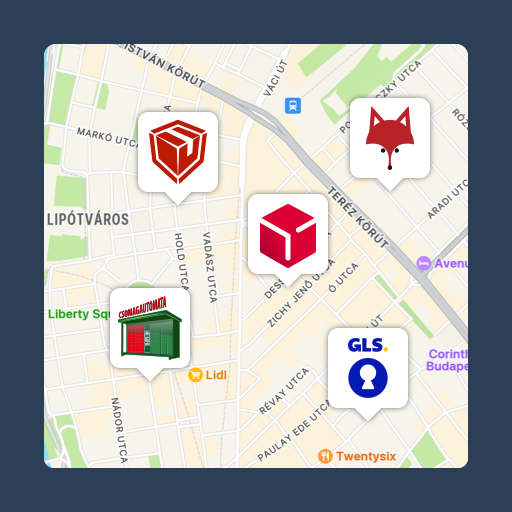
Csomagpontok és Címkék WooCommerce-hez PRO connects pickup selection at checkout with parcel handling in WooCommerce. Customers choose a collection point on a map, while shop administrators set delivery prices, prepare labels, and review shipment details in order management.
Pickup points at checkout
The map supports Postapont, Foxpost, Packeta, GLS, Express One, DPD, and Sameday locations, including easybox points. The pickup-point list syncs daily. The map can zoom to the relevant county using the billing postcode, so customers do not need to enable location services. It also works on mobile devices.
Stores can add their own pickup points with custom icons and change map colors and other display options in the WooCommerce section of the WordPress Customizer. The selected point is saved with the order's shipping details and can appear in WooCommerce emails and the administration interface. If a customer changes delivery method, the point can be removed or replaced. Administrators can filter orders by pickup-point provider.
Delivery prices and cash-on-delivery fees
Set separate prices for each provider. Conditions can use product category, product weight, cart total, or volume. PRO also lets store administrators add a cash-on-delivery fee to pickup-point or other shipping methods, using either a fixed amount or a percentage.
Labels for pickup and home delivery
PRO can generate and print labels for Foxpost, Packeta, GLS, DPD, Posta (MPL), Sameday, Express One, Trans-Sped ZERO, and Csomagpiac. Labels are available for pickup-point shipments and home-delivery orders. Stores can also create their own labels for parcels handled through their own delivery process.
For MPL, Foxpost, Express One, and DPD, shipping-note utilities include daily closing, closing shipment lists, and creating collection lists.
Tracking and parcel-status automation
Tracking data syncs so administrators can check parcel status in order management. WooCommerce order status can change automatically in response to parcel-status events. PRO also lets a store create a tracking page on its own site for customers, so tracking information can be shown there instead of linking to a courier page. Custom parcel-status automation supports store workflows that respond to shipment progress.
Compatible services
PRO is compatible with Számlázz.hu, Woo Billingo Plus, WooCommerce Shipment Tracking, and Yith WooCommerce Order Tracking. It also works with the Webshippy and iLogistic logistics solutions.
Setup
Install the add-on in WordPress, configure the courier services and pricing conditions in the WooCommerce shipping settings, then adjust the map's appearance in the WooCommerce Customizer settings. Enable the pickup or delivery options your store uses, and configure labels, tracking, and parcel-status automation for the PRO workflow.