WordPress plugin
Real3D Flipbook PRO
Real3D Flipbook PRO turns PDFs and picture sets into responsive, interactive WordPress flipbooks for magazines, catalogs, brochures, menus, portfolios, property listings, annual reports, newsletters, ebooks and product manuals. The WebGL view bends pages and includes shadows as readers turn them. For a different reading pace, select CSS 3D or CSS 2D page turns, swipe, continuous scrolling or a simple PDF view.
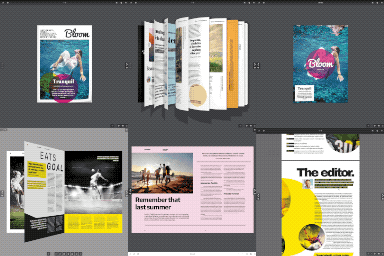
Choose a view for each document
Real3D Flipbook PRO turns PDFs and picture sets into responsive, interactive WordPress flipbooks for magazines, catalogs, brochures, menus, portfolios, property listings, annual reports, newsletters, ebooks and product manuals. The WebGL view bends pages and includes shadows as readers turn them. For a different reading pace, select CSS 3D or CSS 2D page turns, swipe, continuous scrolling or a simple PDF view.
Show a flipbook inline, in a lightbox or fullscreen. On phones, readers can swipe through pages and tap to zoom. Files stay on your server; the flipbook workflow does not require a conversion service, an account or a per-book fee.
PRO utilities for reading and navigation
- 4K zoom: Pages stay sharp as readers enlarge fine print or detailed artwork.
- Adaptive page textures: Multi-tier textures use a size suited to the device and zoom level to support faster loading.
- Clickable PDF links: Links in the original PDF remain usable inside the flipbook.
- Search and text selection: Readers can search and select the full text on every page.
- Viewer customization: Choose from seven layouts and three skins, then adjust colors, icons and buttons.
- Analytics and page links: Track flipbook events with Google Analytics and link directly to a specific page.
- Shared and mobile options: Set phone-specific behavior and defaults for flipbooks across the site.
Social sharing, categories, JSON import and export, and embedded placement help you organize and distribute multiple flipbooks. PDF links on your site can also open automatically as flipbooks, and PDFs can be used to generate thumbnails and flipbook posts.
Create and publish
In WordPress, go to Real3D Flipbook and choose Add New. Upload a PDF or a set of images, select a viewer mode, configure the settings and publish. Add the flipbook to a page or post with the Gutenberg block or shortcode. Existing flipbooks and settings carry over when upgrading to PRO.
The Page Editor, WooCommerce and PDF Tools add-ons are available separately. The Page Editor add-on requires PRO.