WordPress plugin
Sticky Chat Widget Pro
Sticky Chat Widget Pro includes a floating contact widget to a WordPress site. Visitors can select from 25+ listed channels: WhatsApp, Facebook Messenger, Viber, Line, Email, Telegram, VKontakte, SMS, Phone Call, WeChat, Skype, Snapchat, LinkedIn, Twitter, Slack, Instagram, Waze, Google Maps, Signal, TikTok, Contact Form, Discord, Microsoft Teams, Zalo, and custom links. Messaging, email, SMS, and call buttons open the configured service. Map links can point visitors toward a physical location.
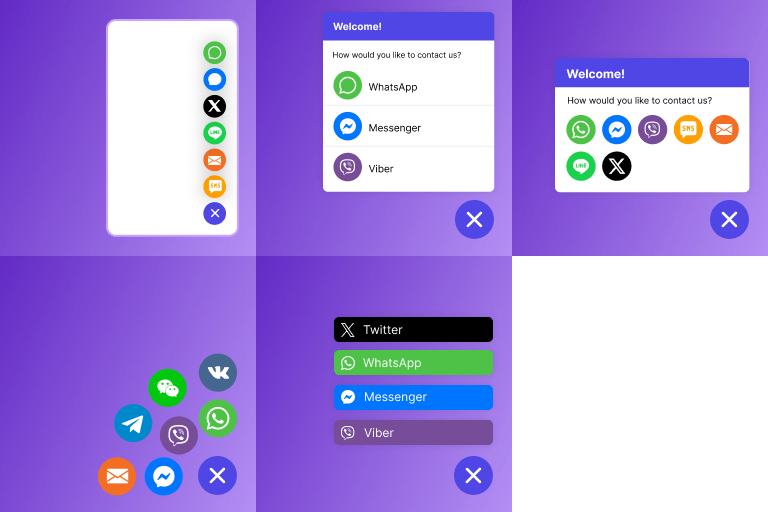
Give users a choice of contact routes
Sticky Chat Widget Pro includes a floating contact widget to a WordPress site. Visitors can select from 25+ listed channels: WhatsApp, Facebook Messenger, Viber, Line, Email, Telegram, VKontakte, SMS, Phone Call, WeChat, Skype, Snapchat, LinkedIn, Twitter, Slack, Instagram, Waze, Google Maps, Signal, TikTok, Contact Form, Discord, Microsoft Teams, Zalo, and custom links. Messaging, email, SMS, and call buttons open the configured service. Map links can point visitors toward a physical location.
Set the widget’s look and display
Choose colors, fonts, icons, size, position, and orientation. Display channels vertically or horizontally, and control their visibility separately on desktop and mobile. You can also add custom call-to-action text, a pending message badge, a dedicated WhatsApp widget, a contact form, and links to selected pages or resources.
Display triggers can display the widget on scroll, after a delay, or when a visitor tries to leave. Available effects include fade, slide, spin, pulse, bounce, and more.
Control where and when it appears
Pro includes the capabilities described for the free version, along with custom icons and images, precise positioning, page targeting, and custom IDs or classes for CSS styling. Set day and time rules or schedule dates for campaigns and events. Country targeting controls visibility by visitor location.
Manage inquiries
Pro adds custom contact form fields, including text, dropdown, and file upload fields. Contact form submissions can be forwarded to your inbox, and an autoresponder can send an automatic reply. Lead integrations can sync submissions with Mailchimp, Mailjet, and other email marketing tools. Google Analytics integration provides widget usage data.
Configure the widget
Install and activate Sticky Chat Widget, then open its settings and add at least one channel. Choose the appearance, position, effects, and device visibility, then save the settings. Pro customers can also set schedules and page targeting, add custom icons or images, configure contact form fields and lead handling, and apply custom IDs or classes. Review the widget on desktop and mobile to check that the selected options appear as intended.