WordPress plugin
Telephone field for Elementor Forms Pro
Telephone field for Elementor Forms Pro includes a country selector with national flags and calling codes. Visitors pick a country before entering a number. The selected country name can also be added automatically to the standard drop-down field in Elementor Forms.
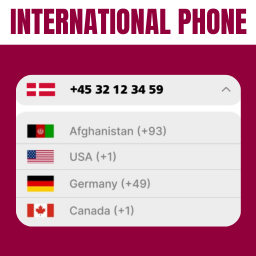
Collect international phone numbers in Elementor Forms
Telephone field for Elementor Forms Pro includes a country selector with national flags and calling codes. Visitors pick a country before entering a number. The selected country name can also be added automatically to the standard drop-down field in Elementor Forms.
The field suits contact, enquiry, registration, and booking forms that may receive numbers from different countries. It is designed for modern browsers and touch-based devices.
Configure country choices and validation
- Country list: Filter the countries available to fit your audience or service area, and place preferred countries near the top.
- Country Search: Let visitors search by country name when the list is long.
- Number validation: Check submitted phone numbers to help reduce invalid entries, throwaway numbers, and typing errors.
Visitors select a country to see its flag and calling code, then enter and submit their number through the form.
Use phone metadata in form behavior
The field can capture available details such as phone type, location, and carrier. Conditional logic can use captured metadata to determine which fields or choices are relevant to a submission. The details available may vary by number.
Choose a default country
The Pro version can detect a default country from the user’s location. You can also set a country manually when you want every visitor to start with the same selection. These defaults work alongside country filters and preferred-country ordering.
Install and set up the field
Install and activate the add-on in your WordPress dashboard, then use its telephone field in an Elementor Form. Configure the available countries, preferred countries, default selection, search, validation, and metadata settings in the form setup.
If a mobile popup closes after a visitor selects a country, the supplied documentation notes that you may need to enable the popup setting Prevent Closing on Overlay.
The product information lists a 30-day money-back guarantee and one year of support for the Pro version.