WordPress plugin
WP Simple Booking Calendar Premium
WP Simple Booking Calendar Premium lets you publish availability on a WordPress site so users can check dates for a holiday home, room, bed and breakfast, office, equipment, or shift schedule. Showing current availability online can reduce repeated questions by phone, chat, or email. Premium adds calendar management, editing, publishing, and customization options for one or more resources.
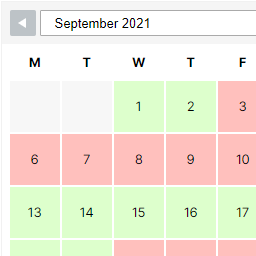
Availability calendars for rentals and resources
WP Simple Booking Calendar Premium lets you publish availability on a WordPress site so users can check dates for a holiday home, room, bed and breakfast, office, equipment, or shift schedule. Showing current availability online can reduce repeated questions by phone, chat, or email. Premium adds calendar management, editing, publishing, and customization options for one or more resources.
Calendar views and date controls
- Create an unlimited number of booking calendars, display multiple months, or present several calendars in an overview.
- Change multiple dates with one click using the bulk editor.
- Add information to individual days for display in a tooltip.
- Hide booking history from visitors when older booking details should not appear.
- Highlight the current day and display week numbers from 1 to 52.
Choose the first day of the week and the month and year where a calendar begins. These settings adjust how dates appear to visitors.
iCal synchronization and CSV export
When a property or resource is listed on multiple sites, synchronize its calendar with Airbnb, Booking.com, HomeAway, FlipKey, and other services that support iCal. This helps keep availability aligned across those services. Calendar dates can also be exported as a CSV file for use outside the calendar interface.
Display, languages, and user assignments
Create legends with custom colors and languages to explain availability states. Set language preferences for the calendar display. Add calendar content to a WordPress page or post with a generated shortcode.
The multiple-calendar overview presents information for several resources together. User management lets you assign specific users to specific calendars, which can help divide calendar maintenance across a team. The responsive layout is intended for visitors using different screen sizes. WordPress multisite support is included for network installations, and professional support is listed with Premium.
Setup and publishing
Install WP Simple Booking Calendar Premium on your WordPress website, create the calendars you need, and enter availability for each day. Configure the display, legend, language, and calendar settings, then generate a shortcode and add it to the page or post where visitors should see availability. If a calendar is also published on services that support iCal, configure synchronization to share availability between the relevant websites.