WordPress plugin
Side Menu Pro
When a user needs a contact option or page shortcut while moving through a page, a sticky side menu can keep that option within reach. Side Menu Pro makes floating menus on the left or right edge of a WordPress site. Menus can link to pages, contact options, offers, calculators, popups, modals and other actions.
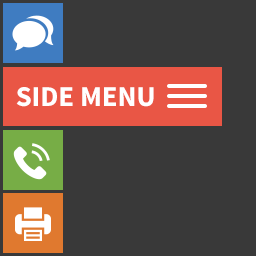
When a user needs a contact option or page shortcut while moving through a page, a sticky side menu can keep that option within reach. Side Menu Pro makes floating menus on the left or right edge of a WordPress site. Menus can link to pages, contact options, offers, calculators, popups, modals and other actions.
Organize links and actions
Group related destinations in submenus, add extended labels for context, or use the hold-label option to keep labels open. Built-in search helps visitors find entries in larger menus. Icons can be emojis, letters, uploaded images or other custom icon assets.
- Add translation links and sharing links for more than 30 social platforms.
- Provide next-post and previous-post navigation.
- Add smooth scrolling, ScrollSpy, scroll-to-top, scroll-to-bottom and print-page actions.
- Set up one-click call, email and bookmark actions.
- Include login, registration, logout and password-recovery links.
Choose where and when menus appear
Display rules can use scroll position, timer delay, URL or referrer URL. You can also display a menu according to page type, category, shortcode, device, language or user role. Schedule its appearance by date, time or day. Browser compatibility rules provide another display condition.
Multilingual support helps adapt menus to different language contexts, and device settings let you control display for desktop or mobile visitors. These options can keep general navigation separate from actions intended for a particular page or audience.
Create a menu in WordPress
After installing Side Menu Pro, create a menu and configure its links, labels, icons, placement and visibility rules. The base extension also supports manual placement with the shortcode [Side-Menu id="1"] on selected pages. Pro settings let you add conditions for device, language, role, URL, schedule and browser compatibility.