WordPress plugin
Team Members PRO
Team Members PRO helps you make and show profiles for staff, employees, or other people on a WordPress site. Add each member’s name, position, bio, photo, and social links in the Teams section of the admin panel, then place the team on a page with a shortcode.
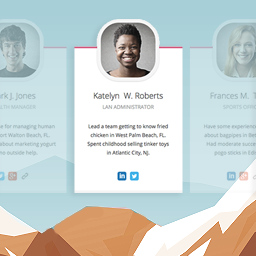
Team Members PRO helps you make and show profiles for staff, employees, or other people on a WordPress site. Add each member’s name, position, bio, photo, and social links in the Teams section of the admin panel, then place the team on a page with a shortcode.
Set the team layout
Choose to show one to five members per line and set the display order to default or random. You can also reorder members to arrange the profiles as needed.
Adjust profile presentation
Use full-width pictures, hide selected members, or reveal more information in a box. PRO includes a second picture on hover, picture filters, and controls to equalize member heights. Per-member color settings let profiles use various colors.
Move members between teams
Import or export members from one team to another when organizing people into departments, project groups, or other team arrangements. Each member can also have two additional social links.
Typical setup
- Create member entries with names, positions, bios, photos, and social links.
- Choose the number of profiles per line and set their order.
- Adjust photos, colors, visibility, and reveal details as needed.
- Use import or export to move members between teams.
- Add the team shortcode to the page where the profiles should appear.